Digitally Archiving Your Employee Records

As soon as a new employee joins your organization, you must create a new, personalized, and secure personnel file. You are legally required to do so.
The file contains information you need for administrative and tax purposes, as well as details that are important for improving skills. The personnel file must also contain evidence if you wish to terminate an employee.
In the personnel file?
An employee file must contain at least the following items:
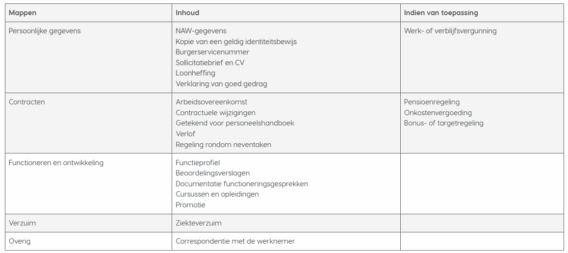
Not available?
Simply put, these are matters that, as an employer, are really none of your business. Such as:
- Sexuality
- Religious Beliefs
- Memberships in organizations
- Criminal Records
- Medical Information
Tidy Up the File Regularly. Employees who have been with the company for a long time don’t necessarily need a thicker file.
Prevent file clutter by going through everything once a year and removing documents that are no longer relevant. Examples include a change of address or a client complaint that has been resolved.
Under the Microscope
Many items in the personnel file are self-explanatory; for example, name and address information requires no further explanation, and it is also crystal clear exactly what adding the employment contract entails.
Copy of ID: Starting with a valid ID. It will not have expired when the file is created, but it may, of course, expire over time. If that happens and the employee is still working at your organization, a new copy must be provided. A DMS can alert you to this if you have configured it to do so.
Signature for the employee handbook: This can be achieved by including a clause in the contract stating that, by signing the employment agreement, the employee also agrees to the contents of the employee handbook. This handbook contains guidelines regarding internal rules, human resources matters, and the collective bargaining agreement.
Job description: This document outlines the employee’s duties, authorities, and responsibilities.
Reports: Take notes on the topics discussed during performance reviews and evaluation meetings. Have the employee sign these minutes and add them to the file. This way, in the event of termination, you can demonstrate that the termination of employment was for just cause.
Correspondence with the employee: Keep official warnings, lease agreements, and emails in the “Miscellaneous” folder.
If, upon termination, the UWV or the employee’s attorney wants to know what you did to improve the employee’s behavior, you should refer to the file.
Terms and Conditions
On its website, the Dutch Data Protection Authority sets out eight requirements that a personnel file must meet in accordance with the General Data Protection Regulation (GDPR) and the General Data Protection Regulation Implementation Act (UAVG).
- As an employer, you are responsible for the correctness and accuracy of all information in the file;
- You must not record more than is relevant;
- Employees must know what data is being collected: on what legal basis and for what purposes;
- They are also informed of their right to object to the processing of their data;
- Have the right to access their data and, if necessary, to correct or delete it;
- And they will also be granted the right to data portability;
- Data may not be retained for longer than necessary;
- Personal data must be properly secured to prevent it from being lost or falling into the wrong hands
Special personal circumstances are listed in Article 21, paragraph 1 of the GDPR. These include illness, board activities, and family circumstances.
The Personnel File
As an employer, you are legally required to inform your employees about their personnel files. You must provide this information before the file is created—and therefore before the contract is signed. Right to Object When you inform an employee of your plans, they naturally have the right to object. This will primarily occur when an employee resigns or is terminated and the data is no longer needed. A former employee may then submit a request to have their personal data no longer used.
Employee Files
Securing all personal data is a requirement under the GDPR. The same rules apply to information obtained through the online contact form as to the digital personnel files you maintain. The Dutch Data Protection Authority sets two requirements in this regard. The first is that you must use modern technology to store the data. This means no internal server from 2009 that is no longer being updated, but rather a cloud solution hosted in a Dutch data center.
If your company outsources the storage of personnel files to a third party, it is important that a data processing agreement be drawn up.
The second requirement is that careful consideration must be given to access permissions. There must be a clear answer to the question of who has access to the information and how this is handled organization-wide.
Destroy or Archive
When an employee leaves the company or documents in the file no longer have any value worth keeping, they must be destroyed. This applies to the file folder as well as all emails, documents saved on the computer, scans in your images folder, and any other locations where documentation might be stored. So, to ensure this can be done with the push of a button, it’s wise to store personnel files in a system and immediately delete the sources from which this information originated.
In a DMS, you can specify the maximum retention period for each file or individual document. As soon as that date arrives, you’ll receive a notification to destroy the document. This saves a lot of manual work updating bins full of data.
Data may be archived only for historical, statistical, or scientific purposes. There is no retention period for personal data in an archive unless it is no longer relevant to the intended purpose.
What can be thrown away and when?
Immediately: Items that can be removed from the file right away include health insurance records and educational history.
1 year after contract termination: All documents related to the job application, such as the resume, cover letter, emails regarding the job interview, the certificate of good conduct, and assessment results.
2 years after contract termination: The contract, any amendments, and the entire file regarding job performance.
5 years after contract termination: A copy of the identification document and payroll tax statements.
7 years after contract termination: All business records, including personal data, payroll records, and terms of employment.
From the personnel file
An employee may request access to their complete personnel file. The employee may then request that the information be corrected if it is factually incorrect or incomplete. The employee may also request a correction if the information is irrelevant to the intended purpose or otherwise violates the law.
From the personnel file
Data portability means that personal data is transferable. This allows an employee to receive their file and, if desired, easily transfer their data to a third party—such as a lawyer—in the event of impending termination. Data portability applies only to stored data that is saved digitally. The difference from a request for access is that, in the case of a request for access, the employee receives a copy of the file; with data portability, the file formats must be transferable so that they can be reused without any problems.
Store personal data securely and accurately. Store personnel files reliably in a smart DMS. This saves time and reduces the risk of a data breach.